
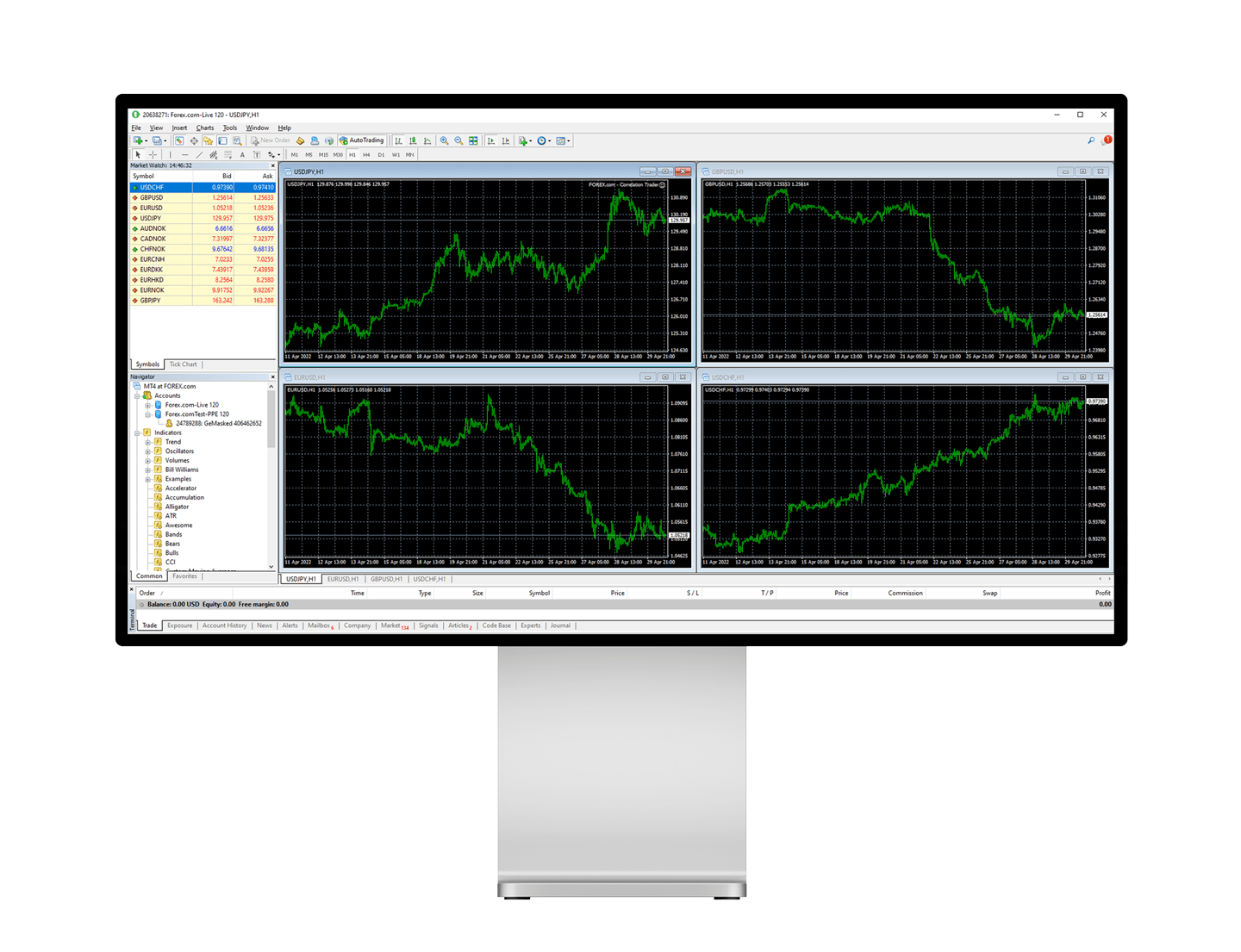
Navigating the MetaTrader 4 (MT4) terminal window can be daunting for newcomers and seasoned traders alike. However, mastering this powerful tool is essential for anyone looking to excel in the world of trading. This blog post will walk you through the key features and functionalities of the Metatrader 4 terminal window, offering valuable insights and practical tips to enhance your trading experience.
Why Understanding the MT4 Terminal Window Matters
The MT4 terminal window is the control center for all your trading activities. Whether you’re monitoring your open positions, managing your orders, or analyzing your trading history, the terminal window is where it all happens. A thorough understanding of its features can significantly improve your trading efficiency and effectiveness.
Getting Started with the Terminal Window
The Layout of the Terminal Window
When you first open the MT4 platform, the terminal window is located at the bottom of the screen. This window is divided into several tabs, each serving a different purpose. Familiarizing yourself with the layout is the first step toward mastering the terminal window.
Navigating the Tabs
The terminal window contains multiple tabs, including Trade, Account History, News, Alerts, Mailbox, and Journal. Each tab provides specific information and functionalities that are crucial for trading. Let’s explore these tabs in detail.
Customizing Your View
One of the best features of MT4 is its customization options. You can adjust the terminal window to suit your preferences, making it easier to access the information you need most. Tailoring your view can enhance your trading efficiency.
The Trade Tab
Monitoring Open Positions
The Trade tab is where you can monitor all your open positions. It provides real-time information about your trades, including the symbol, lot size, stop loss, take profit, and current profit or loss. Keeping an eye on this tab is essential for effective trade management.
Managing Pending Orders
In addition to open positions, the Trade tab also displays your pending orders. You can modify or cancel these orders directly from the terminal window, giving you complete control over your trading strategy.
Equity and Balance
The Trade tab also shows your account balance, equity, and margin levels. These figures are crucial for maintaining proper risk management and ensuring that you have enough funds to support your open positions.
The Account History Tab
Reviewing Past Trades
The Account History tab provides a detailed record of all your past trades. This information is invaluable for analyzing your trading performance and identifying areas for improvement. Reviewing your trade history regularly can help you refine your strategy.
Generating Statements
You can generate detailed account statements directly from the Account History tab. These statements can be customized to include specific date ranges and types of transactions, making it easy to keep track of your trading activity.
Exporting Data
For those who prefer to analyze their trading performance using external tools, the Account History tab allows you to export your trade data in various formats. This flexibility ensures that you can work with your data in the way that best suits your needs.
The News Tab
Staying Informed
The News tab provides real-time updates on market news and economic events. Staying informed about global events is crucial for making well-informed trading decisions. The News tab ensures that you have access to the latest information at all times.
Filtering News
You can customize the News tab to display only the news that is relevant to your trading strategy. Filtering news by importance or category can help you focus on the information that matters most to you.
Setting News Alerts
Setting up news alerts ensures that you never miss an important update. You can configure the terminal window to notify you of significant news events, allowing you to react quickly to market changes.
The Alerts Tab
Creating Alerts
The Alerts tab allows you to set up custom alerts for various market conditions. You can create alerts based on price levels, technical indicators, or specific timeframes. These alerts help you stay on top of market movements without constantly monitoring the charts.
Managing Alerts
Once created, alerts can be modified or deleted directly from the Alerts tab. This flexibility ensures that your alerts remain relevant to your current trading strategy.
Receiving Notifications
Alerts can be configured to send notifications via email, SMS, or pop-up messages. These notifications ensure that you receive timely updates, regardless of whether you’re actively monitoring the terminal window.
The Mailbox Tab
Receiving Broker Messages
The Mailbox tab is where you’ll receive messages from your broker. These messages can include important updates about your account, trading conditions, or platform updates. Regularly checking this tab ensures that you stay informed about any changes that may affect your trading.
Sending Messages
In addition to receiving messages, you can also send messages to your broker directly from the Mailbox tab. This feature allows for seamless communication and ensures that any issues or queries are addressed promptly.
Organizing Your Inbox
The Mailbox tab allows you to organize your messages by date, importance, or subject. This organization helps you quickly find and respond to the most critical messages.
The Journal Tab
Tracking Platform Activity
The Journal tab provides a log of all platform activity, including trade executions, system messages, and error reports. This log is essential for troubleshooting any issues that may arise during your trading session.
Analyzing Errors
If you encounter any errors while using the MT4 platform, the Journal tab will provide detailed information about the issue. Analyzing these logs can help you identify and resolve any problems quickly.
Maintaining Records
Keeping a record of your platform activity can be beneficial for future reference. The Journal tab allows you to export your logs, ensuring that you have a comprehensive record of all your trading activities.
Conclusion
Mastering the MetaTrader 4 terminal window is essential for any trader looking to enhance their trading experience. By understanding the features and functionalities of each tab, you can make more informed decisions, manage your trades effectively, and stay updated with the latest market news. Take the time to explore and customize the terminal window to suit your needs, and you’ll be well on your way to becoming a more proficient trader. Happy trading!

Yin and Yang: The Pillars of Daoist Thought and Meditation
Yin and Yang(Yin und Yang) are basic principles in Daoism (Taoism), representing the duality that exists in every elements of the universe. This historical Chinese vision emphasizes stability and balance, which can be essential for psychic well-being and powerful meditating procedures. Yin and Yang are not opposites but contrasting causes that socialize to form a […]